C++ for Serverless - Always Faster?
The motivation to use compiled languages in serverless is straightforward - they typically provide better performance, which translates not only to faster executions but also to lower costs. In SeBS, our benchmarking suite for serverless functions, we have long supported Python and Node.js workloads with automatic build, deployment, and configuration across cloud providers. For a while, we also had initial support for functions written in C++. We have finally ported more benchmarks to C++ - many thanks to Horia for the help and his contributions! - and merged them in pull requests #99 and #293.
Our benchmark collection covers a broad spectrum of realistic workloads: web application backends, multimedia processing, utilities, scientific computing, and ML inference. To deploy these in C++, we need to implement several components in SeBS:
- Create a general C++ handler that wraps benchmark implementations and connects them to the platform-specific interface.
- Implement wrappers for storage and other cloud services used by our benchmarks.
- Provide a set of prebuilt C++ libraries used by the benchmarks.
- Assemble benchmark code, wrappers, and dependencies into a single deployment, either as a code package or a container.
Before we merged the first PR, I decided to test the performance and compare it against Python. After all, we should expect better performance even if many Python functions rely on libraries that delegate all the heavy lifting to lower-level C and C++ code. The results, as it turns out, were not quite what I expected, and things got even weirder once I started to look into cold startup performance.
C++ Functions on AWS Lambda
Our function handler is based on the official AWS Lambda C++ Runtime. The runtime provides a simple interface: we define a handler that accepts an invocation request, processes it, and returns a response. We wrap this interface so that benchmark functions remain free of platform-specific logic - all of that is contained in our handler. The handler takes care of parsing the JSON payload, timing the benchmark execution, and attaching metadata such as cold start information and a container ID. Let’s walk through the code.
We start with global variables that persist across invocations within the same Lambda sandbox and declare the benchmark function signature:
// Global variables that are retained across function invocations
bool cold_execution = true;
std::string container_id = "";
std::string cold_start_var = "";

// Main benchmark implementation
rapidjson::Document function(const rapidjson::Value& req);
Our very first implementation used AWS-specific types Aws::Utils::Json::JsonValue and Aws::Utils::Json::JsonView here, as these were already provided by the AWS SDK that was used by pretty much every benchmark. Later, in PR #293, we replaced it by introducing rapidjson as an explicit dependency.
The handler begins by parsing the incoming JSON. When the function is invoked through an API Gateway HTTP trigger, the actual payload arrives serialized as a string under the body key, so we need to parse it a second time. Direct SDK invocations don’t have this wrapping:
aws::lambda_runtime::invocation_response handler(aws::lambda_runtime::invocation_request const &req)
{
  rapidjson::Document json;
  json.Parse(req.payload.c_str());
  if(json.HasParseError()) {
    return aws::lambda_runtime::invocation_response::failure("Invalid JSON", "application/json");
  }

  // HTTP trigger with API Gateway sends payload as a serialized JSON
  // stored under key 'body' in the main JSON
  // The SDK trigger converts everything for us
  if (json.HasMember("body") && json["body"].IsString()) {
    rapidjson::Document body_doc;
    body_doc.Parse(json["body"].GetString());
    if(body_doc.HasParseError()) {
      return aws::lambda_runtime::invocation_response::failure("Invalid JSON", "application/json");
    }

    json = std::move(body_doc);
  }
Then we call the actual benchmark function, measure its execution time, and package the results with the metadata that SeBS needs for analysis:
  const auto begin = std::chrono::system_clock::now();
  auto ret = function(json);
  const auto end = std::chrono::system_clock::now();

  rapidjson::Document body;
  body.SetObject();
  auto& alloc = body.GetAllocator();

  auto b = std::chrono::duration_cast<std::chrono::microseconds>(begin.time_since_epoch()).count() / 1000.0 / 1000.0;
  auto e = std::chrono::duration_cast<std::chrono::microseconds>(end.time_since_epoch()).count() / 1000.0 / 1000.0;
  body.AddMember("result", ret, alloc);
  body.AddMember("begin", b, alloc);
  body.AddMember("end", e, alloc);
  body.AddMember("results_time", e - b, alloc);
  body.AddMember("request_id", rapidjson::Value(req.request_id.c_str(), alloc), alloc);
  body.AddMember("is_cold", cold_execution, alloc);
  body.AddMember("container_id", rapidjson::Value(container_id.c_str(), alloc), alloc);
  body.AddMember("cold_start_var", rapidjson::Value(cold_start_var.c_str(), alloc), alloc);

  // Switch cold execution after the first one.
  if(cold_execution)
    cold_execution = false;

  rapidjson::Document final_result;
  final_result.SetObject();
  final_result.AddMember("body", body, final_result.GetAllocator());

  rapidjson::StringBuffer buffer;
  rapidjson::Writer<rapidjson::StringBuffer> writer(buffer);
  final_result.Accept(writer);

  return aws::lambda_runtime::invocation_response::success(buffer.GetString(), "application/json");
}
The main function initializes the AWS SDK, generates a unique container identifier that SeBS uses to distinguish sandboxes, and enters the runtime handler loop. The conditional compilation based on the SEBS_USE_AWS_SDK flag initializes and shuts down the AWS SDK C++; we use it only when benchmarks explicitly ask for sdk as a dependency. If a function does not need to access the object storage S3 or NoSQL storage DynamoDB, then there’s no need to link SDK and spend time on initializing it.
int main()
{
#ifdef SEBS_USE_AWS_SDK
  Aws::SDKOptions options;
  Aws::InitAPI(options);
#endif

  const char * cold_var = std::getenv("cold_start");
  if(cold_var)
    cold_start_var = cold_var;
  container_id = boost::uuids::to_string(boost::uuids::random_generator()());

  aws::lambda_runtime::run_handler(handler);

#ifdef SEBS_USE_AWS_SDK
  Aws::ShutdownAPI(options);
#endif
  return 0;
}
If a function needs to access cloud services, then we provide platform-agnostic wrappers. In the case of the S3 object storage, we implement access with the official AWS C++ SDK. This generic interface can be reimplemented in the future for a different cloud.
std::tuple<std::string, uint64_t> sebs::Storage::download_file(
    Aws::String const &bucket, Aws::String const &key
) {
  Aws::S3::Model::GetObjectRequest request;
  request.WithBucket(bucket).WithKey(key);
  auto bef = timeSinceEpochMicrosec();

  Aws::S3::Model::GetObjectOutcome outcome = this->_client.GetObject(request);
  if (!outcome.IsSuccess()) {
    std::cerr << "Error: GetObject: " << outcome.GetError().GetMessage() << std::endl;
    return {"", 0};
  }
  auto &s = outcome.GetResult().GetBody();
  uint64_t finishedTime = timeSinceEpochMicrosec();

  std::string content(std::istreambuf_iterator<char>(s), std::istreambuf_iterator<char>());
  return {content, finishedTime - bef};
}
The S3 client is initialized only once for the entire lifetime of a serverless sandbox, since the first startup comes with significant overhead. In C++, the natural approach would be a static global object - but that doesn’t work here, because the SDK itself relies on static initialization. In C++, the order of static initialization across different translation units is undefined, and mixing our static client with the SDK’s own static objects leads to unpleasant consequences.
Instead, we rely on a static local variable, which is initialized the first time the function is called:
rapidjson::Document function(const rapidjson::Value& request)
{
  static sebs::Storage client = sebs::Storage::get_client();
  // ...
}
This matters more than it might seem: creating the storage client dynamically would add 7-8 milliseconds to each warm invocation!
Building and Deploying C++ Functions
In Python and Node.js, installing dependencies is simple - pretty much every library can be acquired with a package manager. C++ is a different story: package managers have not been standardized and are nowhere near as popular. We solve this by providing a set of Docker images, each containing a build of a specific dependency such as OpenCV, PyTorch, or igraph. These images also ship the official AWS Lambda C++ Runtime and the AWS C++ SDK.
As an example, here is the image that provides Boost, which we use for UUID generation:
ARG BASE_IMAGE
FROM ${BASE_IMAGE} as builder
ARG WORKERS
ENV WORKERS=${WORKERS}

RUN dnf install -y cmake git gcc-11.5.0-5.amzn2023.0.5.x86_64 gcc-c++-11.5.0-5.amzn2023.0.5.x86_64 make tar gzip which python-devel
RUN curl -LO https://archives.boost.io/release/1.79.0/source/boost_1_79_0.tar.gz\
      && tar -xf boost_1_79_0.tar.gz && cd boost_1_79_0\
      && echo "using gcc : : $(which g++) ;"  >> tools/build/src/user-config.jam\
      && ./bootstrap.sh --prefix=/opt\
      && ./b2 -j${WORKERS} --prefix=/opt cxxflags="-fPIC" link=static install

FROM ${BASE_IMAGE}

COPY --from=builder /opt /opt
The deployment itself requires no custom logic. Whether we deploy the function as a code package or a container, the steps are almost identical to the Python and Node.js benchmarks. For C++, we create a general-purpose build image that aggregates all dependencies. At deployment time, we compile the benchmark and link it against them. On AWS, this produces a single executable that runs our handler, packaged together with all dynamic dependencies. For container-based deployments, we create a final image containing everything needed for that particular function.
This worked quite well. The only hiccup was a version bump of the C++ SDK from 1.11.590 to 1.11.642: since the SeBS framework itself is implemented in Python, we upload benchmark inputs through boto3, which uses multi-part upload for large files like the ResNet model for 411.image-recognition. When the C++ function tried to download such an object from S3 storage, it would fail with a Response checksums mismatch. The root cause was missing support for composite checksums in the AWS C++ SDK, which has since been fixed.
Performance of Image Processing with OpenCV
One of the popular benchmarks in our suite is 210.thumbnailer, which generates thumbnails from images stored in cloud storage. The benchmark provides three primary measurements: time to download a 3.6 MiB image from S3, time to generate a thumbnail, and time to upload the smaller result.
First, let’s check how the Python version performs. We download the image from object storage (never saving it to a file), open the binary stream as an image in Pillow, create a thumbnail, and upload the result to object storage:
from PIL import Image

# SeBS cloud-agnostic wrappers for object storage
from . import storage
client = storage.storage.get_instance()

def resize_image(image_bytes, w, h):

    with Image.open(io.BytesIO(image_bytes)) as image:

        image.thumbnail((w,h))
        out = io.BytesIO()
        image.save(out, format='jpeg')
        out.seek(0)
        return out

# simplified handler
def handler(bucket, input, output, key, width, height):

    img = client.download_stream(bucket, os.path.join(input, key))

    resized = resize_image(img, width, height)
    resized_size = resized.getbuffer().nbytes

    key_name = client.upload_stream(bucket, os.path.join(output, key), resized)
Running this benchmark requires a single command. SeBS automatically handles resource initialization, input upload, code packaging, function creation, and invocation:
sebs.py benchmark invoke 210.thumbnailer test --config config/python.json  --deployment aws

[20:10:13.763893] SeBS-feb5 Created experiment output at /work/serverless/2021/sebs/dev/test-cpp
[20:10:15.069642] AWS.Resources-1475 No resources for AWS found, initialize!
[20:10:15.071344] AWS.Config-379f Using user-provided config for AWS
[20:10:15.108342] AWS.SystemResources-48f3 Initialize S3 storage instance.
[20:10:15.797155] AWS-4df7 Generating unique resource name 2c8f270a
[20:10:16.391190] AWS.S3-3b1c Initialize a new bucket for benchmarks
[20:10:16.839550] AWS.S3-3b1c Created bucket sebs-benchmarks-2c8f270a
The tool uploads benchmark input data (ten images in this case), and then builds the deployment package using our standardized Docker environment:
[20:10:17.041343] AWS.S3-3b1c Upload sebs/../benchmarks-data/200.multimedia/210.thumbnailer/4_altitude-astrology-astronomy-1819650.jpg to sebs-benchmarks-2c8f270a
# ... and more

[20:10:35.224345] Benchmark-033b Building benchmark 210.thumbnailer. Reason: no cached code package/container.
[20:10:35.240518] Benchmark-033b Docker pull of image spcleth/serverless-benchmarks:build.aws.python.3.10-1.2.0
[20:10:37.436714] Benchmark-033b Docker build of benchmark dependencies in container of image spcleth/serverless-benchmarks:build.aws.python.3.10-1.2.0
[20:10:37.437078] Benchmark-033b Docker mount of benchmark code from path 210.thumbnailer_code/python/3.10/x64/package
[20:10:42.107052] AWS-4df7 Created 210.thumbnailer_code/python/3.10/x64/package/210.thumbnailer.zip archive
[20:10:42.107199] AWS-4df7 Zip archive size 4.604641 MB
[20:10:42.107654] Benchmark-033b Created code package (source hash: 4d735ce143548c7936288c68f04903d5), for run on aws with python:3.10
[20:10:42.108071] Benchmark-6aa6 Caching code package created at 210.thumbnailer_code/python/3.10/x64/package/210.thumbnailer.zip
Once the code package is ready, we can upload code and create the function. Here, we do it directly with a single API call, but SeBS also supports uploading the code package to object storage when the code package is too large to be used directly:
[20:10:42.110224] AWS-4df7 Creating new function! Reason: function sebs_2c8f270a_210_thumbnailer_python_3_10_x64 not found in cache.
[20:10:43.689136] AWS-4df7 Creating function sebs_2c8f270a_210_thumbnailer_python_3_10_x64 from package cache/210.thumbnailer/aws/python/3.10/x64/package/210.thumbnailer.zip
[20:10:47.046849] AWS-4df7 Waiting for Lambda function to be created...
[20:10:50.773753] AWS-4df7 Lambda function has been created.
[20:10:51.077991] AWS-4df7 Waiting for Lambda function to be updated...
[20:10:52.403601] AWS-4df7 Lambda function has been updated.
[20:10:52.403738] AWS-4df7 Updated configuration of sebs_2c8f270a_210_thumbnailer_python_3_10_x64 function.
[20:10:53.175660] AWS.Resources-1475 Creating HTTP API sebs_2c8f270a_210_thumbnailer_python_3_10_x64-http-api
[20:10:54.362534] AWS-4df7 Created HTTP trigger for sebs_2c8f270a_210_thumbnailer_python_3_10_x64 function. Sleep 5 seconds to avoid cloud errors.
The benchmark is executed five times, and all executions are saved in the experiments.json file, including the timing information and details about the function deployment. Additionally, we update the cache with the new function configuration, so that next time we can skip the deployment step and save time.
[20:10:59.364801] SeBS-feb5 Beginning repetition 1/5
[20:11:04.759674] SeBS-feb5 Beginning repetition 2/5
[20:11:05.784416] SeBS-feb5 Beginning repetition 3/5
[20:11:06.809278] SeBS-feb5 Beginning repetition 4/5
[20:11:07.831800] SeBS-feb5 Beginning repetition 5/5
[20:11:08.756281] SeBS-feb5 Save results to experiments.json
[20:11:08.757428] Benchmark-6aa6 Update cached config cache/aws.json
Afterwards, we process the results - SeBS queries AWS CloudWatch logs to extract detailed timing information:
sebs.py benchmark process --config config/python.json  --deployment aws

[20:37:18.230999] AWS.Resources-8a82 Using cached resources for AWS
[20:37:18.232417] AWS.Config-62e0 Using cached config for AWS
[20:37:18.271780] AWS-7965 Using existing resource name: 2c8f270a.
[20:37:18.276542] SeBS-60a2 Load results from experiments.json
[20:37:18.767924] AWS.Resources-ced5 Using cached resources for AWS
[20:37:18.769359] AWS.Config-8dc2 Using cached config for AWS
[20:37:19.560642] AWS-7965 Waiting for AWS query to complete ...
[20:37:20.757086] AWS-7965 Received 5 entries, found results for 5 out of 5 invocations
[20:37:20.758410] SeBS-60a2 Save results to results.json
At 256 MiB of memory (the minimum for this benchmark), the function takes around 540 ms. Since CPU resources on AWS Lambda are allocated proportionally to memory, we can also test with 1769 MiB, which provides a full allocation of 1 vCPU. SeBS makes this trivial - the cached function is updated automatically:
sebs.py benchmark invoke 210.thumbnailer test --config config/python.json  --deployment aws --repetitions 11 --memory 1769

[00:23:09.831662] AWS-93d7 Updating function configuration due to changed attribute memory: cached function has value 256 whereas 1769 has been requested.
[00:23:10.619990] AWS-93d7 Waiting for Lambda function to be updated...
[00:23:11.990141] AWS-93d7 Lambda function has been updated.
[00:23:11.990280] AWS-93d7 Updated configuration of sebs_2c8f270a_210_thumbnailer_python_3_10_x64 function.
With a full vCPU, the total runtime drops to 150-170 ms. Since SeBS provides fine-grained measurements of individual function stages, we can also inspect the CPU-intensive image resizing step in isolation: it decreases from ~280 ms to 40-45 ms.
Now let’s implement the C++ counterpart with OpenCV:
void thumbnailer(const std::vector<char>& jpeg_data, int64_t width, int64_t height, cv::Mat &out)
{
  try {
    cv::Mat in = cv::imdecode(jpeg_data, cv::IMREAD_COLOR);

    // Calculate thumbnail size while maintaining aspect ratio
    int orig_width = in.cols;
    int orig_height = in.rows;

    // Use smaller scale to fit within bounds
    double scale_w = static_cast<double>(width) / orig_width;
    double scale_h = static_cast<double>(height) / orig_height;
    double scale = std::min(scale_w, scale_h);

    int new_width = static_cast<int>(orig_width * scale);
    int new_height = static_cast<int>(orig_height * scale);

    // Resize image (equivalent to PIL's thumbnail method)
    cv::resize(in, out, cv::Size(new_width, new_height), 0, 0, cv::INTER_LINEAR);
  }
  catch (const cv::Exception &e)
  {
    std::cerr << "OpenCV error: " << e.what() << std::endl;
  }
}

rapidjson::Document function(const rapidjson::Value& request)
{
  // Simplified code - download the file.
  std::string input_key = input_key_prefix + "/" + image_name;
  auto ans = client.download_file(bucket_name, input_key);
  std::string body_str = std::get<0>(ans);
  auto download_time = std::get<1>(ans);

  // Create a thumbnail image and encode it as a JPEG binary blob.
  std::vector<char> vectordata(body_str.begin(), body_str.end());
  cv::Mat out_image;
  thumbnailer(vectordata, width, height, out_image);
  std::vector<unsigned char> out_buffer;
  cv::imencode(".jpg", out_image, out_buffer);

  // Determine upload key_name and send data to S3.
  Aws::String upload_data(out_buffer.begin(), out_buffer.end());
  client.upload_random_file(
    bucket_name, key_name, true,
    reinterpret_cast<char *>(out_buffer.data()),
    out_buffer.size()
  );
}
Pillow is a highly-optimized library that delegates all the heavy lifting to C and C++ code, so it already achieves quite good performance. With a native C++ implementation using OpenCV, we should be at least on par - but that is not what happens. OpenCV takes over 1.6 seconds at 256 MiB and 310 ms at 1769 MiB, significantly worse than the Python version. The resource-constrained Python version at 256 MiB performs better than C++ with a full vCPU!
Hunting Down the Regression
I went through everything I could think of to explain this:
- Verified that all optimization flags are correct (
-O3,-DNDEBUG). - Checked if we need to enable additional optimization, such as AVX2 instructions.
- Disabled multi-threading in OpenCV and OpenCL support - just in case.
- Measured the overhead of copying image data between the S3 wrapper and OpenCV.
- Verified overhead of encoding the image back to JPEG format after resizing; this takes less than 700 microseconds.
I also confirmed that OpenCV was built with the right codecs and hardware support. The CMake configuration summary showed libjpeg-turbo for JPEG decoding:
#6 44.19 --   Media I/O:
#6 44.19 --     ZLib:                        build (ver 1.2.11)
#6 44.19 --     JPEG:                        libjpeg-turbo (ver 2.0.5-62)
#6 44.19 --     WEBP:                        build (ver encoder: 0x020f)
#6 44.19 --     PNG:                         build (ver 1.6.37)
#6 44.19 --     TIFF:                        build (ver 42 - 4.0.10)
#6 44.20 --     JPEG 2000:                   build (ver 2.3.1)
CPU dispatching was also set up correctly, with specialized builds for SSE4, AVX2, and AVX-512:
#6 44.19 --   CPU/HW features:
#6 44.19 --     Baseline:                    SSE SSE2 SSE3
#6 44.19 --       requested:                 SSE3
#6 44.19 --     Dispatched code generation:  SSE4_1 SSE4_2 FP16 AVX AVX2 AVX512_SKX
#6 44.19 --       requested:                 SSE4_1 SSE4_2 AVX FP16 AVX2 AVX512_SKX
#6 44.19 --       SSE4_1 (13 files):         + SSSE3 SSE4_1
#6 44.19 --       SSE4_2 (1 files):          + SSSE3 SSE4_1 POPCNT SSE4_2
#6 44.19 --       FP16 (0 files):            + SSSE3 SSE4_1 POPCNT SSE4_2 FP16 AVX
#6 44.19 --       AVX (3 files):             + SSSE3 SSE4_1 POPCNT SSE4_2 AVX
#6 44.19 --       AVX2 (24 files):           + SSSE3 SSE4_1 POPCNT SSE4_2 FP16 FMA3 AVX AVX2
#6 44.19 --       AVX512_SKX (2 files):      + SSSE3 SSE4_1 POPCNT SSE4_2 FP16 FMA3 AVX AVX2 AVX_512F AVX512_COMMON AVX512_SKX
And the compiler flags looked sane:
#6 44.19 --   C/C++:
#6 44.19 --     Built as dynamic libs?:      YES
#6 44.19 --     C++ standard:                11
#6 44.19 --     C++ Compiler:                /usr/bin/c++  (ver 11.5.0)
#6 44.19 --     C++ flags (Release):         -fsigned-char -W -Wall -Werror=return-type -Werror=non-virtual-dtor -Werror=address -Werror=sequence-point -Wformat -Werror=format-security -Wmissing-declarations -Wundef -Winit-self -Wpointer-arith -Wshadow -Wsign-promo -Wuninitialized -Winit-self -Wsuggest-override -Wno-delete-non-virtual-dtor -Wno-comment -Wimplicit-fallthrough=3 -Wno-strict-overflow -fdiagnostics-show-option -Wno-long-long -pthread -fomit-frame-pointer -ffunction-sections -fdata-sections  -msse -msse2 -msse3 -fvisibility=hidden -fvisibility-inlines-hidden -O3 -DNDEBUG -DNDEBUG
#6 44.19 --     C Compiler:                  /usr/bin/cc
#6 44.19 --     C flags (Release):           -fsigned-char -W -Wall -Werror=return-type -Werror=address -Werror=sequence-point -Wformat -Werror=format-security -Wmissing-declarations -Wmissing-prototypes -Wstrict-prototypes -Wundef -Winit-self -Wpointer-arith -Wshadow -Wuninitialized -Winit-self -Wno-comment -Wimplicit-fallthrough=3 -Wno-strict-overflow -fdiagnostics-show-option -Wno-long-long -pthread -fomit-frame-pointer -ffunction-sections -fdata-sections  -msse -msse2 -msse3 -fvisibility=hidden -O3 -DNDEBUG  -DNDEBUG
Everything looked correct on paper. After a long debugging session and brainstorming with Gemini, I finally found the culprit: OpenCV performs full image decoding eagerly:
cv::Mat in = cv::imdecode(jpeg_data, cv::IMREAD_COLOR);
Pillow, on the other hand, performs lazy loading - the image is not fully decoded until we access pixel data, which in our case happens only when we call thumbnail. For a 3.6 MiB JPEG, this makes an enormous difference: the input image is much larger than the thumbnail.
Bypassing OpenCV with libjpeg-turbo
I could not find a suitable interface to implement lazy loading in OpenCV. However, OpenCV uses libjpeg-turbo internally for JPEG decoding, and this library supports scaling down the image during JPEG decompression. It doesn’t support arbitrary sizes, but it supports factors of 1/2, 1/4, and 1/8 - sufficient for our use case. Once we have a much smaller intermediate image, we can use OpenCV for the final resize to the exact thumbnail dimensions:
static tjhandle tj_handle = tjInitDecompress();

// Read original image properties without decoding the entire image
int orig_width, orig_height, subsamp, colorspace;
tjDecompressHeader3(
  tj_handle, reinterpret_cast<const unsigned char *>(jpeg_data.data()),
  jpeg_data.size(), &orig_width, &orig_height, &subsamp, &colorspace
);

// Find the largest possible factor that works for our image
int scale_num = 1, scale_denom = 1;
for (int denom : {8, 4, 2, 1}) {
  if (orig_width / denom >= target_width &&
      orig_height / denom >= target_height) {
    scale_denom = denom;
    break;
  }
}

// libjpeg-turbo supports these exact fractional scales during decode
tjscalingfactor sf = {scale_num, scale_denom};
int scaled_width = TJSCALED(orig_width, sf);
int scaled_height = TJSCALED(orig_height, sf);

std::vector<unsigned char> buffer(scaled_width * scaled_height * 3);
tjDecompress2(
  tj_handle, reinterpret_cast<const unsigned char *>(jpeg_data.data()),
  jpeg_data.size(), buffer.data(), scaled_width, 0, scaled_height,
  TJPF_BGR, TJFLAG_FASTDCT | TJFLAG_FASTUPSAMPLE
);

double scale_w = static_cast<double>(target_width) / orig_width;
double scale_h = static_cast<double>(target_height) / orig_height;
double scale = std::min(scale_w, scale_h); // Use smaller scale to fit within bounds

target_width = static_cast<int>(orig_width * scale);
target_height = static_cast<int>(orig_height * scale);

cv::Mat temp(scaled_height, scaled_width, CV_8UC3, buffer.data());
// Final scaling step.
if (scaled_width != target_width || scaled_height != target_height) {
  cv::resize(temp, out, cv::Size(target_width, target_height), 0, 0, cv::INTER_LINEAR);
}
Quick benchmarking on 1769 MiB of memory confirms the improvement: while the OpenCV version with full imdecode takes over 200 ms just to decompress the image and only a few hundred microseconds to resize it, the new fast decode takes only 40-45 ms.
Benchmark Results
Finally, we use SeBS perf-cost experiment to automatically generate 50 samples for each memory configuration, measuring both cold and warm startups to provide exact measurements. We compute median of timings reported by the cloud provider; SeBS also returns intra-function measurements and timings as observed by the benchmarking client. The coefficient of variation ranged from 4% to 17%, with higher variance observed on larger memory configurations.
With the default OpenCV implementation, C++ shows a clear performance regression compared to Python:
| Time (ms) | C++ 256 MiB | C++ 1769 MiB | Python 256 MiB | Python 1769 MiB |
|---|---|---|---|---|
| Cold, Init | 351.3 | 347.4 | 113 | 114.5 |
| Cold, Exec | 2399 | 414.9 | 4480.3 | 738.1 |
| Warm, Exec | 1679.2 | 314.7 | 541.6 | 167.7 |
Even here, one benefit of C++ is already visible: cold executions are consistently faster, since the compiled binary has much less startup work to do than the Python interpreter importing and initializing all libraries. But the execution time tells a different story - C++ is three times slower in the warm case at 256 MiB.
However, once we switch to our libjpeg-turbo-based thumbnailer, the picture changes dramatically:
| Time (ms) | C++ 256 MiB | C++ 1769 MiB | Python 256 MiB | Python 1769 MiB |
|---|---|---|---|---|
| Cold, Init | 358.8 | 346.6 | 113 | 114.5 |
| Cold, Exec | 848.1 | 198 | 4480.3 | 738.1 |
| Warm | 422 | 138.9 | 541.6 | 167.7 |
Not only did we match Python’s performance, but we also slightly improved upon it! Warm execution is now about 17% faster than Python.
Note: the measurements were taken before merging pull request #293, which replaced AWS SDK’s JSON library with rapidjson. However, our input and output JSONs are rather small (except for graph benchmarks, which we do not benchmark here), and the performance impact of such change is likely to be very small.
Cold Startup Performance
In the results, there is one interesting outlier - cold performance. While the total cold performance (initialization time and execution time) favors C++ significantly, the initialization time is unexpectedly higher. To the best of my knowledge, the init duration measurement includes all time from starting the application process until it connects to the local Lambda endpoint and awaits new invocations. In Python, this includes the pure overhead of starting a Python process, as the entire initialization of AWS SDK (boto3) happens during the first invocation.
In C++, the situation is slightly different. When we link the AWS C++ SDK, we need to initialize before the first use. In our case, we decided to implement it in the main function for simplicity, and this step could add up to 100 ms to the first invocation. Additionally, we noticed the function needs over 200 ms from the very beginning of initialization - as indicated by the INIT_START entry in AWS CloudWatch - to the very first line of our main function. This overhead could be at least partially caused by the static initialization of the AWS C++ SDK, which is difficult to hide unless we try to load the library dynamically with dlopen.
Thus, we also executed the microbenchmark 010.sleep that does not use the SDK. There, the init duration for the cold invocation was about ~150ms, which is lower but still higher than expected: we knew from our Cppless paper that the initialization overheads should be much lower!
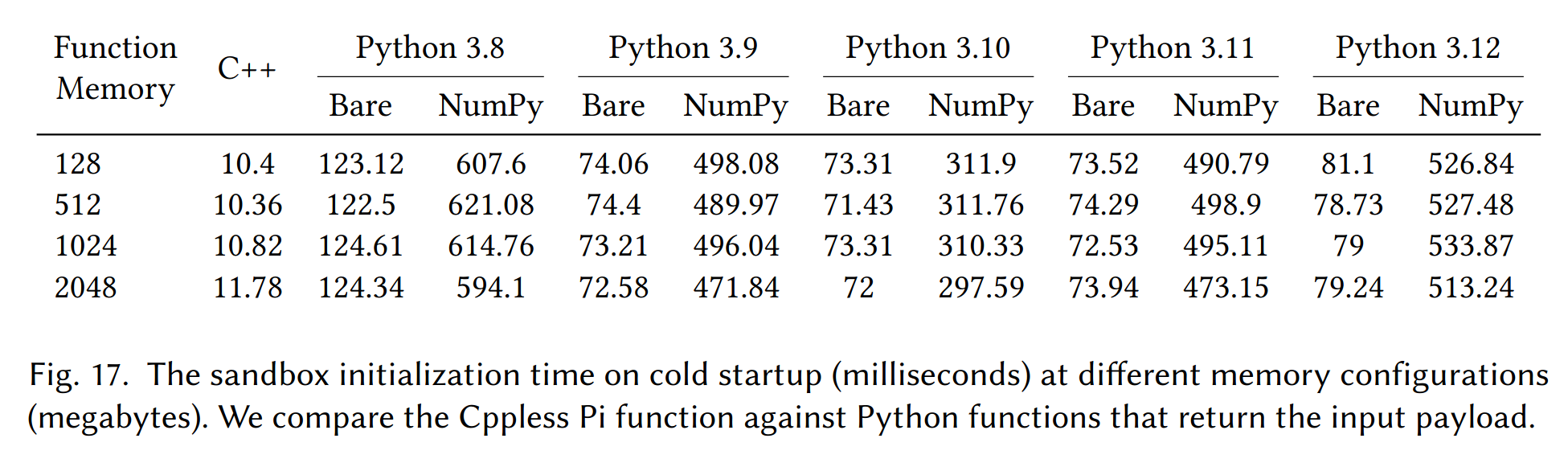
These measurements were taken in June 2024. I began by redeploying a simple Cppless example, and the cold startup initialization time was now 90-100 ms:
REPORT RequestId: e0b6f5ce-0ff4-4bf6-8068-6695a3680012 Duration: 13.85 ms Billed Duration: 124 ms Memory Size: 1024 MB Max Memory Used: 28 MB Init Duration: 109.77 ms
I checked my AWS account, I still had an original deployment of a Cppless benchmark function that has been dormant since July 2024. I executed that function again and the cold initialization time was still around 10-15 ms:
REPORT RequestId: c9485409-b690-4299-b64d-faeb045ed46d Duration: 1.20 ms Billed Duration: 13 ms Memory Size: 1024 MB Max Memory Used: 16 MB Init Duration: 11.13 ms
But here, the situation gets even stranger. Since it is difficult to isolate all changes that might have affected the build, I decided to first download the code package deployment of the fast function from 2024, and create a new Lambda function with exactly the same code and configuration. I ran it again with the AWS CLI, and lo and behold:
REPORT RequestId: 6d971a5b-969b-45ec-b99f-7855e665ba3a Duration: 8.48 ms Billed Duration: 109 ms Memory Size: 1024 MB Max Memory Used: 26 MB Init Duration: 100.31 ms
At this point, it looks like whatever is happening during the initialization, was likely caused by the AWS runtime. Did AWS add additional security checks for provided runtime where clients upload unknown binaries? Or did they change the underlying Amazon Linux 2023 runtime, and our old function deployment is still bound to the older release? I’m not sure yet, but it is a very interesting observation that deserves further investigation, and a beautiful example of dealing with limitations of black-box serverless runtimes.
Summary
C++ can minimize overheads in serverless, but the exact benefits depend on the workload. As this post shows, naively porting a Python function to C++ does not always guarantee better performance - understanding how each library handles data under the hood matters just as much as the choice of language.
Currently, SeBS supports several C++ workloads: a microbenchmark 010.sleep, and four realistic functions - the 210.thumbnailer discussed here, 411.image-recognition (ResNet inference with PyTorch), and the graph operations 501.graph-pagerank and 503.graph-bfs. With C++ support, we can expand towards more scientific and HPC-aligned workloads, conduct experiments that require low overhead of the benchmarking function itself (such as measuring I/O latency and bandwidth in serverless), and explore entirely new types of workloads like GPU-accelerated functions with CUDA.
What’s next? We plan to build an ARM cross-compilation toolchain targeting the Graviton CPUs offered on AWS Lambda. On Azure Functions, we want to try the custom runtime support to integrate C++ functions. For Google Cloud, we are looking at Google Cloud Run containers, which are the backbone of the second generation of Cloud Functions. Furthermore, we would like to explore the potential of WebAssembly as a portable compilation target for C++ code, which can be executed in a sandboxed environment on pretty much any platform, including Node.js on Google Cloud Functions and Cloudflare Workers.
Interested in more work on serverless C++? Check out Cppless, our LLVM-based compiler for serverless functions. In Cppless, we extract C++ lambdas at compile time, build them into standalone binaries, deploy them to AWS Lambda, and invoke them in parallel - all from a single-source program:
double pi_estimate(int n)
{
  std::random_device r;
  std::default_random_engine e(r());
  std::uniform_real_distribution<double> dist;

  int hit = 0;
  for (int i = 0; i < n; i++) {
    double x = dist(e);
    double y = dist(e);
    if (x * x + y * y <= 1)
      hit++;
  }

  return 4 * static_cast<double>(hit) / n;
}

int main(int, char*[])
{
  const int n = 100000000;
  const int np = 128;

  cppless::aws_dispatcher dispatcher;
  auto aws = dispatcher.create_instance();

  std::vector<double> results(np);
  auto fn = [=] { return pi_estimate(n / np); };
  for (auto& result : results)
    cppless::dispatch(aws, fn, result);
  cppless::wait(aws, np);

  auto pi = std::reduce(results.begin(), results.end()) / np;
  std::cout << pi << std::endl;
}
In the paper, we show that C++ functions provide excellent scalability and performance. We also demonstrate deployment to ARM environments (with a full toolchain integrated into LLVM) and integration into Google Cloud by compiling C++ to WebAssembly, invoked through the officially supported Node.js runtime (a small prototype so far).
You can find more details in our ACM TACO paper, which was presented in January 2026 at the HiPEAC 2026 conference. At the same conference, I also presented the very first tutorial on benchmarking serverless with SeBS - if you missed it, you can find the tutorial materials on GitHuB and try them with SeBS!
Enjoy Reading This Article?
Here are some more articles you might like to read next: